

API Endpoints
Authentication
Section titled “Authentication”The public API uses a bearer token for authentication. You can get a token by logging to your Papra account and creating an API token.
How to create an API token
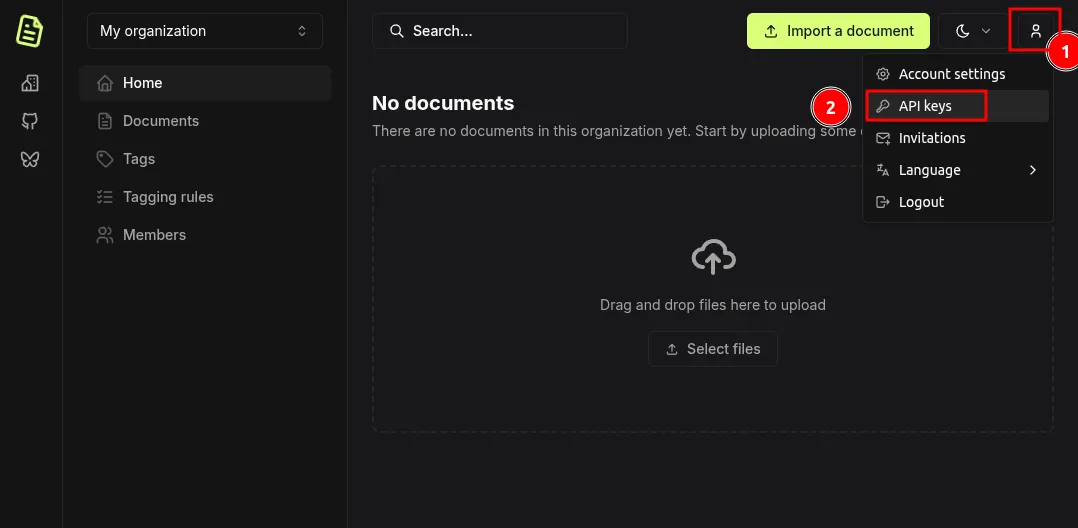
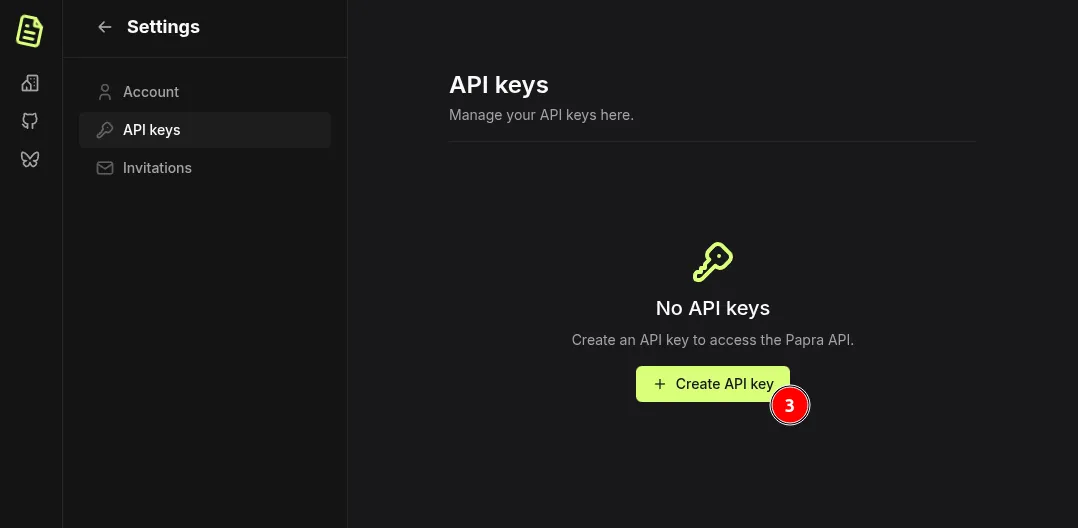
To authenticate your requests, include the token in the Authorization header with the Bearer prefix:
Authorization: Bearer YOUR_API_TOKENExamples
Section titled “Examples”Using cURL:
curl -H "Authorization: Bearer YOUR_API_TOKEN" \ https://api.papra.app/api/organizationsUsing JavaScript (fetch):
const response = await fetch('https://api.papra.app/api/organizations', { headers: { 'Authorization': 'Bearer YOUR_API_TOKEN', 'Content-Type': 'application/json' }})API Key Permissions
Section titled “API Key Permissions”When creating an API key, you can select from the following permissions:
Organizations:
organizations:create- Create new organizationsorganizations:read- Read organization information and list organizations of the userorganizations:update- Update organization detailsorganizations:delete- Delete organizations
Documents:
documents:create- Upload and create new documentsdocuments:read- Read and download documentsdocuments:update- Update document metadata and contentdocuments:delete- Delete documents
Tags:
tags:create- Create new tagstags:read- Read tag information and list tagstags:update- Update tag detailstags:delete- Delete tags
Endpoints
Section titled “Endpoints”Check current API key
Section titled “Check current API key”GET /api/api-keys/current
Get information about the currently used API key.
- Required API key permissions: none
- Response (JSON)
apiKey: The current API key information.id: The API key ID.name: The API key name.permissions: The list of permissions associated with the API key.
List organizations
Section titled “List organizations”GET /api/organizations
List all organizations accessible to the authenticated user.
- Required API key permissions:
organizations:read - Response (JSON)
organizations: The list of organizations.
Create an organization
Section titled “Create an organization”POST /api/organizations
Create a new organization.
- Required API key permissions:
organizations:create - Body (JSON)
name: The organization name (3-50 characters).
- Response (JSON)
organization: The created organization.
Get an organization
Section titled “Get an organization”GET /api/organizations/:organizationId
Get an organization by its ID.
- Required API key permissions:
organizations:read - Response (JSON)
organization: The organization.
Update an organization
Section titled “Update an organization”PUT /api/organizations/:organizationId
Update an organization’s name.
- Required API key permissions:
organizations:update - Body (JSON)
name: The new organization name (3-50 characters).
- Response (JSON)
organization: The updated organization.
Delete an organization
Section titled “Delete an organization”DELETE /api/organizations/:organizationId
Delete an organization by its ID.
- Required API key permissions:
organizations:delete - Response: empty (204 status code)
Create a document
Section titled “Create a document”POST /api/organizations/:organizationId/documents
Create a new document in the organization.
- Required API key permissions:
documents:create - Body (form-data)
file: The file to upload.ocrLanguages: (optional) The languages to use for OCR.
- Response (JSON)
document: The created document.
List documents
Section titled “List documents”GET /api/organizations/:organizationId/documents
List all documents in the organization.
- Required API key permissions:
documents:read - Query parameters
pageIndex: (optional, default: 0) The page index to start from.pageSize: (optional, default: 100) The number of documents to return.searchQuery: (optional) Search query, can reference Filters for a more defined searchsortField: (optional, default:createdAt) Field to sort by, one ofcreatedAt,updatedAt,name,documentDate.sortOrder: (optional, default:desc) Sort direction, one ofasc,desc.
- Response (JSON)
documents: The list of documents.documentsCount: The total number of documents.
List deleted documents (trash)
Section titled “List deleted documents (trash)”GET /api/organizations/:organizationId/documents/deleted
List all deleted documents (in trash) in the organization.
- Required API key permissions:
documents:read - Query parameters
pageIndex: (optional, default: 0) The page index to start from.pageSize: (optional, default: 100) The number of documents to return.
- Response (JSON)
documents: The list of deleted documents.documentsCount: The total number of deleted documents.
Get a document
Section titled “Get a document”GET /api/organizations/:organizationId/documents/:documentId
Get a document by its ID.
- Required API key permissions:
documents:read - Response (JSON)
document: The document.
Delete a document
Section titled “Delete a document”DELETE /api/organizations/:organizationId/documents/:documentId
Delete a document by its ID.
- Required API key permissions:
documents:delete - Response: empty (204 status code)
Get a document file
Section titled “Get a document file”GET /api/organizations/:organizationId/documents/:documentId/file
Get a document file content by its ID.
- Required API key permissions:
documents:read - Response: The document file stream.
Get organization documents statistics
Section titled “Get organization documents statistics”GET /api/organizations/:organizationId/documents/statistics
Get the statistics (number of documents and total size) of the documents in the organization.
- Required API key permissions:
documents:read - Response (JSON)
organizationStats: The organization documents statistics.documentsCount: The total number of documents.documentsSize: The total size of the documents.
Update a document
Section titled “Update a document”PATCH /api/organizations/:organizationId/documents/:documentId
Change the name or content (for search purposes) of a document.
- Required API key permissions:
documents:update - Body (JSON)
name: (optional) The document name.content: (optional) The document content.
- Response (JSON)
document: The updated document.
Reprocess a document
Section titled “Reprocess a document”POST /api/organizations/:organizationId/documents/:documentId/reprocess
Enqueue a background task to reprocess an existing document using the current instance configuration, including its OCR languages. Processing happens asynchronously; existing content and tags are not cleared while the task is pending.
- Required API key permissions:
documents:update - The authenticated user must belong to the organization.
- Body: none
- Response: empty (202 status code). This confirms the task was queued, not that processing has completed.
- Rate limit: 100 requests per hour per organization by default, configurable with
DOCUMENT_REPROCESSING_RATE_LIMIT. - Errors
403(document.reprocessing_disabled): Reprocessing is disabled viaDOCUMENT_REPROCESSING_ENABLED(enabled by default).404(document.not_found): The document does not exist in the organization or is in the trash.429(server.too_many_requests): The organization’s reprocessing rate limit has been exceeded. TheRetry-Afterheader indicates how many seconds to wait before retrying.
Get document activity
Section titled “Get document activity”GET /api/organizations/:organizationId/documents/:documentId/activity
Get the activity log of a document.
- Required API key permissions:
documents:read - Query parameters
pageIndex: (optional, default: 0) The page index to start from.pageSize: (optional, default: 100) The number of documents to return.
- Response (JSON)
activities: The list of activities.
Create a tag
Section titled “Create a tag”POST /api/organizations/:organizationId/tags
Create a new tag in the organization.
- Required API key permissions:
tags:create - Body (form-data)
name: The tag name.color: The tag color in hex format (e.g.#000000).description: (optional) The tag description.
- Response (JSON)
tag: The created tag.
List tags
Section titled “List tags”GET /api/organizations/:organizationId/tags
List all tags in the organization.
- Required API key permissions:
tags:read - Response (JSON)
tags: The list of tags.
Update a tag
Section titled “Update a tag”PUT /api/organizations/:organizationId/tags/:tagId
Change the name, color or description of a tag.
- Required API key permissions:
tags:update - Body
name: (optional) The tag name.color: (optional) The tag color in hex format (e.g.#000000).description: (optional) The tag description.
- Response (JSON)
tag: The updated tag.
Delete a tag
Section titled “Delete a tag”DELETE /api/organizations/:organizationId/tags/:tagId
Delete a tag by its ID.
- Required API key permissions:
tags:delete - Response: empty (204 status code)
Add a tag to a document
Section titled “Add a tag to a document”POST /api/organizations/:organizationId/documents/:documentId/tags
Associate a tag to a document.
- Required API key permissions:
tags:readanddocuments:update - Body
tagId: The tag ID.
- Response: empty (204 status code)
Remove a tag from a document
Section titled “Remove a tag from a document”DELETE /api/organizations/:organizationId/documents/:documentId/tags/:tagId
Remove a tag from a document.
- Required API key permissions:
tags:readanddocuments:update - Response: empty (204 status code)
Apply tagging rule to existing documents
Section titled “Apply tagging rule to existing documents”POST /api/organizations/:organizationId/tagging-rules/:taggingRuleId/apply
Enqueue a background task to apply a tagging rule to all existing documents in the organization. This endpoint returns immediately with a task ID, and the processing happens asynchronously in the background. The task will check all documents and apply tags where the rule’s conditions match.
- Required API key permissions:
tags:readanddocuments:update - Response (JSON, HTTP 202)
taskId: The ID of the background task. You can use this to track the task’s progress (task status retrieval coming in a future release).
List custom property definitions
Section titled “List custom property definitions”GET /api/organizations/:organizationId/custom-properties
List all custom property definitions in the organization.
- Required API key permissions:
custom-properties:read - Response (JSON)
propertyDefinitions: The list of custom property definitions.
Get custom property definition
Section titled “Get custom property definition”GET /api/organizations/:organizationId/custom-properties/:propertyDefinitionId
Get a custom property by its ID.
- Required API key permissions:
custom-properties:read - Response (JSON)
definition: The custom property definition.
Create a custom property definition
Section titled “Create a custom property definition”POST /api/organizations/:organizationId/custom-properties
Create a new custom property definition in the organization.
- Required API key permissions:
custom-properties:create - Body (JSON)
name: The custom property name.type: The custom property type (text,number,date,boolean,select,multi_select,user_relation,document_relation).description: (optional) The custom property description.options: (optional, only valid for typeselectandmulti_select): list of optionsname: Name of the option
- Response (JSON)
propertyDefinition: The created custom property definition.
Update a custom property definition
Section titled “Update a custom property definition”PUT /api/organizations/:organizationId/custom-properties/:propertyDefinitionId
Change the name, description or select options of a custom property definition. The property type cannot be changed after creation.
- Required API key permissions:
custom-properties:update - Body
name: (optional) The custom property name.description: (optional) The custom property description.options: (optional, only valid for typeselectandmulti_select): list of optionsid: (only for existing options) ID of the optionname: Name of the option
- Response (JSON)
propertyDefinition: The updated custom property definition.
Delete a custom property definition
Section titled “Delete a custom property definition”DELETE /api/organizations/:organizationId/custom-properties/:propertyDefinitionId
Delete a custom property definition by its ID.
- Required API key permissions:
custom-properties:delete - Response: empty (204 status code)
List all custom properties of a document
Section titled “List all custom properties of a document”GET /api/organizations/:organizationId/documents/:documentId/custom-properties
List all currently set custom properties of a document with their respective values.
- Required API key permissions:
custom-properties:readanddocuments:read - Response (JSON)
customProperties: The list of currently set custom properties.
Set a custom property value on a document
Section titled “Set a custom property value on a document”PUT /api/organizations/:organizationId/documents/:documentId/custom-properties/:propertyDefinitionId
Sets the value of a custom property on a document.
- Required API key permissions:
custom-properties:readanddocuments:update - Body
value: The new value - forselect,user_relationanddocument_relationproperties this is the select option / user / document ID, formulti_selectproperties this is a list of select option IDs
- Response: empty (204 status code)
Clear a custom property from a document
Section titled “Clear a custom property from a document”DELETE /api/organizations/:organizationId/documents/:documentId/custom-properties/:propertyDefinitionId
Clear the value of a custom property on a document.
For multi_select properties send an update with an empty list instead.
- Required API key permissions:
custom-properties:readanddocuments:update - Response: empty (204 status code)